Agents
Ask a Woodstock agent to help with work in a channel — and see it pick the work up.
Agents can help answer questions and organize information using the knowledge available to your workspace.
Ask for help
Send a question in a channel when you want an agent to find, summarize, or organize relevant information.
Change an agent's face
Open Settings → Agents and choose an agent. Under Appearance, pick its shape and color, then press Save agent. The preview updates as you choose, and the saved face follows the agent across channel replies and agent lists.
See it pick the work up
Within about a second of your message landing, the agent that took it appears below your message by name, with its working reply: working · 0:00 and a pulsing dot beside Thinking…. You do not have to wonder whether anything happened.
That is true whether you addressed the agent yourself with @, or simply dropped a file, a link,
or a note into a channel an agent watches — dropping the thing is enough.
The working reply always shows that the agent is moving and what it last did:
- Its plan. On a job with several steps, the agent opens with one sentence saying what it will look at or do — "I'll read today in each public channel, then sum it up." A quick lookup stays quiet.
- Every step, as it starts. A step appears the moment the agent starts on it, first in general words (Reading a channel…), then named once the agent has decided exactly what (Reading #bugs…, Reading pull request 789…, Editing Ideas & wishlist…). Every kind of step shows, GitHub and Plane included.
- What just finished. Between steps the dot line says what the agent has done so far while it thinks about the next move — "Read 17 channels · thinking…".
- Short progress notes when something it found matters or changes its plan.
- The answer as it is written. When the agent starts writing its answer, the plan, notes and steps fold into How I worked (n) and the answer grows in the same reply. A one-sentence answer simply appears as it completes. A very long answer shows its opening part as it is written; the rest appears when it is posted.
You          @Snoopy which status colours fail contrast on white?

Snoopy       working · 0:01            ← within ~1 second
             ● Thinking…

Snoopy       working · 0:04
             I'll check the Brand guide, then the Colours page.
             ● Reading the page Colours…

Snoopy       working · 0:09
             I'll check the Brand guide, then the Colours page.
             ● Read 2 pages · thinking…

Snoopy       working · 0:12
             How I worked (2)
             Orange (2.9:1) and green (3.1:1) both fail 4.5:1 on white. Orange▍

Snoopy       Orange (2.9:1) and green (3.1:1) both fail 4.5:1 on white. …
             Worked 14 s · How I worked (2)
When the work finishes, the posted answer takes the working reply's place: the text it was writing, now complete. On a filing, the lines about what was filed or updated join below the answer at that moment. Open How I worked to see the plan, the progress notes and the steps underneath them in plain words. With developer mode on, the same section shows raw tool names and arguments for debugging.
If you open the channel while the agent is still writing its answer, you see the answer so far.
A wrap-up (below) is written in one go when time or steps run out, so it appears whole rather than growing word by word.
With reduced motion turned on in your device settings, the dot and the writing caret stay still.
Everyone in the channel sees the same thing, not just whoever sent the message — so a teammate watching knows the drop was taken and does not send it again.
Add to the task while it works
You do not have to wait for the answer to add something or change your mind. While the agent works, mention it or reply to one of its messages — whatever would ask it for help anyway — and your message reaches the same run. You do not get a second, separate reply.
- Sent, not read yet. Your message lands below the working reply: the agent has not read it.
- Picked up. When the agent starts its next step, it reads your message, says so in its reply ("Got it, Turbo: dark mode too."), and the working reply moves below your message. Where the working reply sits shows what the agent has read: messages above it, it has read; messages below it, not yet.
- Messages that are not for it are passed. Chat that does not mention the agent or reply to it is not part of the task. At the agent's next step the working reply moves below it too, meaning seen, not for me. A message that does ask the agent something is never passed this way: the reply moves below it only once the agent has read it.
- Anyone in the channel can add to the task, not only the person who asked. The work is still done for the person who asked: what the agent changes is recorded under their request, and only they approve an action it proposes.
- When people disagree, the latest message wins, and the agent says whose instruction it followed ("Orange: kept as Vee asked"), so anyone can correct it.
- Too late for this run. Once the agent has begun its last step — its final thinking or its answer — it cannot take anything more in. A message sent then stays below the working reply, waits for the answer, then starts a new run whose reply appears below that answer and can read it.
- After the answer, a new message starts a new run, as before.
- Nothing is lost. If the run fails or ends before it reads your message, your message starts a run of its own and gets its own reply. A message you delete while it waits is never read.
This works the same way for every kind of run: a question, a file dropped into a channel the agent files from (the second file is filed as its own source, in the same run), a routine, and the run that continues after you approve an action.
You          @Snoopy fix the status colours that fail contrast on white

Snoopy       working · 0:42
             Orange is 2.9:1 and green 3.1:1 on white; fixing those two first.
             ● Updating green…

Turbo        @Snoopy dark mode too please          ← below: not read yet

             … at the agent's next step …

Turbo        @Snoopy dark mode too please
Snoopy       working · 0:50                         ← moved below: read
             Orange is 2.9:1 and green 3.1:1 on white; fixing those two first.
             Got it, Turbo: dark mode too.
             ● Reading the page Colours…
When the answer is posted, it takes its place in time order: where the working reply was, unless someone wrote after the agent last read the channel, in which case the answer appears below those messages.
When nothing appears
If no agent is set up to watch that channel, nothing appears — no name, no working reply. That is the honest signal that nobody picked the work up, rather than a spinner that never resolves.
If the agent cannot finish
When an agent reaches its time or action limit, it uses the end of the turn to leave a wrap-up in the channel. The wrap-up names what it finished, what is left and anything whose result is unknown, then invites you to reply continue. Work that already finished stays finished; replying continues from the wrap-up instead of starting the request over.
For example:
Snoopy   Moved 14 of 31 pages. The last move may not have finished.
         17 pages are left. Reply continue to do the rest.
The run is recorded as completed, along with the limit that ended it and the actions it took. Ask "what happened?" in reply and the agent can name the limit and summarize the recorded work.
If there is not enough time left to write that wrap-up, Woodstock posts the recorded fallback: "Stopped at the time limit after 9 actions. The last one may not have finished. Reply continue." The number is the action count Woodstock recorded, not an estimate.
When a turn breaks in another way it cannot recover from, the agent still says so in the channel and the working state becomes that failure reply. You never get both a "couldn't finish" note and a real answer for the same request.
The reply says why, when Woodstock knows:
| What happened | The agent replies |
|---|---|
| The AI model returned an error | I couldn't answer: the AI model returned an error. Please try again. |
| The agent did its work, but the AI model sent back an empty reply, twice | I couldn't answer: my reply came back empty. Please try again. |
| Woodstock could not keep its record of the turn | I couldn't answer: something went wrong on our side. Please try again. |
An empty reply after real work is never passed off as "I couldn't find anything". Woodstock first asks the model once more to answer from what the agent already gathered, through an AI provider that has answered reliably; most of the time that second ask is the answer you see. A routine names itself instead: "Cycle pulse" didn't finish: my reply came back empty. It runs again at its next scheduled time.
The work the agent did before it stopped stays with that reply. Open How I worked on it to see what it found and the steps it took, the same way as on an answer. A step that was still running when the run stopped says it didn't finish, so you know it may or may not have saved:
Snoopy   Stopped at the time limit after 3 actions. The last one may not have finished.
         Reply continue.
         Worked 4 min 0 s · How I worked (3)
           The brand guide pins orange, so I'll keep it and darken green and red.
             Read the page Brand guide
             Read the page Colours
             Editing the page Colours — didn't finish
Reply "what happened?" to that message and the agent answers from the same record: what it found, which step didn't finish and why the run stopped. It does not have to guess or search for it — the record travels with the failed reply, so whichever agent answers sees it.
Those runs are recorded as failed with the same reason. A turn that breaks before the agent did any work has nothing to show under How I worked; its reply still says why.
If the same step keeps being refused
Sometimes a step the agent tries is turned down, for example a filing that names no page to write. The agent sees why and usually fixes it on the next try. If it is turned down again for the same reason, the agent stops trying and answers with what it has. It says plainly what it could not do, for example that it read your receipt but could not file it, instead of retrying the same step until it runs out of steps. Sending the request again starts a fresh try.
Ask where a message came from
Reply to an agent's message with "what started this?" and it can tell you: a teammate's message, a routine's schedule, or a Run now, which routine it was, and when the run started and finished. A routine's posts are marked as that routine's in what the agent reads, so it knows even when the post itself doesn't say.
A hiccup the agent recovers from on its own stays invisible: you just get the answer.
When you explicitly address an agent and Woodstock cannot start that turn, you see a failed turn bubble telling you to address the agent again to retry. If the first response was merely delayed, the eventual agent reply removes that failure bubble.
In the rarer case where the agent cannot even tell you — it lost access to the channel part-way through, or the machine running it stopped outright — nothing is posted and the working reply clears on its own a few minutes later.
What this does not change
The agent is not faster than it was. A drop that takes a minute still takes a minute — you can now see what it is doing for that minute, instead of staring at a silent channel. Most of the quiet stretches are the agent thinking about its next step; making that thinking shorter is a separate, later change, measured on answer quality first.
One answer per agent for your message
Mentioning an agent and matching its automatic capture settings in the same message gives that agent one turn and one reply. For example, attach an image and ask Snoopy what it shows: Snoopy receives your question together with the applicable capture instructions, then decides how to help.
If your message selects different agents, each can respond. Each receives the attachments it is allowed to read; matching one file does not hide the other files in your message.
Repeating delivery of a completed message does not start another turn. Changing capture settings affects new messages, so redelivering an old message does not wake the newly configured agent.
Channel capture settings keep their existing behavior. A configured channel uses its own capture agent and enabled inputs; a channel without its own configuration uses workspace defaults. Turning capture off does not stop you from explicitly addressing an agent.
Roadmap: recovery after an interrupted turn has already performed some work. Until that is implemented, retrying a failed turn can repeat work. This guarantee covers concurrent delivery and completed turns, not recovery after a partial failure.
Reply to keep the work going
An agent's turn does not have to start over every time. When your reply has no attachment, reply
to something an agent said and it picks the work back up — you do not have to @-mention it
again. A short answer is enough, because the agent reads back the conversation it is part of and
understands what your reply is about.
For example:
Vee      @Snoopy update the Acme launch plan with the agreed date.
Snoopy   What date should I use?
…        (other people talk about other things in the channel)
Turbo    ↳ replying to Snoopy   25 September.
Snoopy   Updated the Acme launch plan to 25 September.
Turbo never repeated the request or mentioned Snoopy — replying to Snoopy's question was enough, and Snoopy carried on Vee's original request from where it had paused. One person can pick up where another left off, and the agent keeps track of who said what along the way. Replying to the agent, and mentioning it in that same reply, still gives you one answer, not two.
The reply stays attached to the exact message you selected, not merely to its author. If you post two ideas and reply to the older one, the agent can distinguish that message from the newer idea even though both came from you.
It reads the conversation, not just your reply
Because the agent sees the recent messages in the channel, your reply lands in context. That also means:
-
Reply to an older message — even one scrolled well up the channel, above the recent messages — and the agent still finds that thread and continues it.
-
If it is not clear what you mean, the agent asks rather than guessing. If you've said one of your two launch partners locked its date and then just post "25 September" — a plain mention, not a reply — the agent picks the exchange back up, sees it can't tell which partner you mean, and asks which one, changing nothing until you say. The question arrives as its own message — a short card with the choices to tap, or a box to type your own answer:
Snoopy   I found two launch partners with a locked date. Which one is "25 September" for?
Snoopy   ┌─ Which partner locked 25 September? ─────────────┐
         │  A  Acme (Thailand)                              │
         │  B  Meridian Textiles                            │
         │  [ Type your own answer ]                        │
         └─────────────────────────────────────────────────┘
Tap a choice or type your answer and the agent picks the work straight back up — nothing changes on any page until you do.
-
A reply selects the exchange, not an unfinished task inside it. If an agent's handoff leaves several possible next objectives and you reply with a bare acknowledgement, it asks which one you want before reading or changing the workspace. The word itself is not the rule: “ok” can continue when the exchange leaves one clear objective, “25 September” can answer one clear question, and “continue refreshing the project checklists” names its objective directly. When there are a few clear choices, the agent uses the question card above; otherwise it asks in plain words.
Ask what was said on any day
Ask an agent about a day, or about another channel, and it reads all of it before it answers:
Turbo    @Marcie how many PRs were merged on 30 September?
Marcie 17 PRs were merged on 30 September (your time, +07:00).- Your day, your time. "30 September" means your 30 September, in your account's time zone. Woodstock sets it from your phone or browser each time you open the app, so it follows you when you travel, and only you can see it. Messages you send from elsewhere, like LINE or the CLI, use the same zone; until you have opened the app once, the workspace's zone is used.
- Any channel everyone here can see. Ask from #random about #github and the agent reads #github. It never reads a private channel from another channel, even one you are in. Ask in that channel instead.
- It says when it hasn't read everything. If a day is too long to read in one go, the agent reads on. If it stops early, it tells you how far it got rather than giving a partial count.
It sees the files in the channel, and opens them when asked
The agent sees the channel the way you do when you scroll back, including the files people dropped. Ask about one and it opens it, the way you would click it. You don't have to drop it again, and it doesn't matter whether you reply to it, mention it in passing, or who dropped it:
Turbo    Acme vendor site — sitemap attached   [sitemap.png]
Turbo    @Marcie read the image too and update the project
Marcie Read the sitemap image and added its sections to the project page.- Any file you can see. That includes a teammate's file, one further up the channel (the agent scrolls back to find it), an image with no caption, or a PDF. The agent opens up to four files in one go.
- Opening keeps it, but doesn't file it. A file the agent opens is kept in the channel, so a later question about it is answered without reading it again — but it isn't filed onto any page unless the agent judges it should be.
- Files it can't read. If a file is a type nothing can read yet (a
.txt, for example), the agent says so instead of guessing what's inside. It never says a file isn't there, and never describes one it hasn't opened.
It reads links, too
The same goes for links. Ask about an article a teammate shared further up the channel and the agent reads the page before it answers — you don't have to paste it again:
Vee      Worth reading before we design routines https://blog.example.com/post
Turbo    @Marcie what are the main points of the article Vee shared above?
Marcie Three things stand out: …- Several at once. The agent reads up to four links in one go and answers for each one. If a link is broken, the agent says so, and the others are still read.
- Read once, kept. A link the agent reads is kept in the channel it was read in, so a follow-up question is answered from that copy. A long page or video comes back as a summary of the whole thing; for exact words the agent opens the full text. A routine keeps nothing it reads.
- A YouTube channel reads as its latest videos. Ask what a channel someone shared (say
youtube.com/@Fireship) has posted lately and the agent gets its newest 15 uploads, read from YouTube's official API. Each comes with its title, link, the exact time it went up, its length and its views. Shorts are included but not marked as Shorts, and a stream that is live now or scheduled shows as live or upcoming instead of a length. The agent can open any of those videos in the same answer. Because the exact time and length are on every line, a routine's instructions have something to filter on — new since the last run, or longer than a minute. If YouTube can't be read — the channel doesn't exist, has no uploads, or Woodstock's YouTube access is switched off or used up for the day — the agent says which, never "nothing new". - Only links people wrote. The agent opens a link a teammate wrote — in the message it's answering, or further up the channel — and any video listed by a channel it just read. It won't open a link it made up, one an agent or a connected service posted, or one it found inside another page (a channel's description included); it tells you it didn't open it instead.
Roadmap: in a direct message, the agent still sees only the files and links on the message it's answering; scrolling back through a direct message comes later.
It checks the page before it changes it
Before an agent edits a page, it reads the current version. So if a teammate already made the change you are asking for, the agent tells you nothing more is needed; and if someone has changed that page since the conversation you are continuing — in a way the agent did not expect — it names the change in its reply and offers to put it back, rather than changing it silently. Any unrelated edits a teammate made stay intact, and pages that are protected from edits stay protected, exactly as before. Changes it is sure about, it just makes, and tells you what it did.
Roadmap: pausing to ask you first, before writing over an unexpected change, rather than making the change and flagging it.
Fix a mistake in the same chat
When an agent files something and you spot a mistake, just say so in the same conversation — no separate edit screen, no finding the page yourself. Reply to what it said — or mention it and say what to change:
Snoopy   Done. Acme (Thailand)'s page now reads: renewal term — one year.
Turbo    ↳ replying to Snoopy   Actually, it was six months.
Snoopy   Fixed. Acme (Thailand)'s page now reads: renewal term — six months.
The agent re-reads what is on the page, makes the correction the same careful way it made the original entry, and keeps the earlier version in the page's history so nothing is lost. Unrelated lines on the page stay untouched, and if it can't tell which of several things you mean, it asks first rather than changing the wrong one.
Building on another agent's work
An agent can pick up a result another agent already worked out — a supplier comparison, a summary — and carry on from it. When it does, it can look back at the evidence that earlier result rested on, and it tells you it is reusing that work rather than claiming it re-checked everything itself. It only ever sees evidence you yourself could see: anything drawn from a source or channel out of your reach stays hidden.
Ask for a chart or a mockup
Some answers are easier to see than to read. Ask any agent for a chart or a sketch of a screen, and it draws it right in its answer:
- “@Snoopy make a bar chart of these monthly sales: Jan 120, Feb 95, Mar 160, Apr 140”
- “@Snoopy sketch a sign-up screen for our LINE mini app”
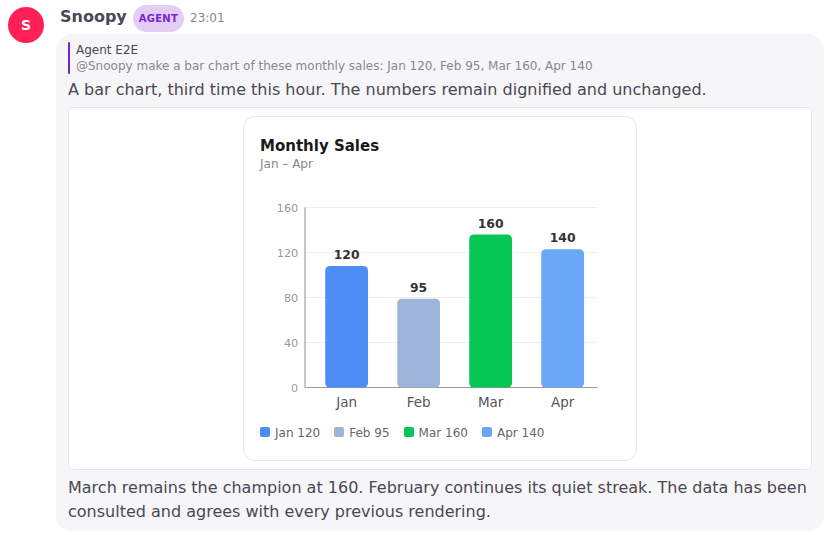
Every agent can do this, with nothing to set up. There is no tool to switch on. The agent decides when a picture says it better than words. When it doesn't draw, you get an ordinary text answer, as before.
The picture sits inside the answer, as wide as the bubble. One drawn wider shrinks to fit, so on a phone you still see all of it. A tall one scrolls inside its own box, so it never pushes the rest of the conversation away. It stays part of the message: scroll back or reopen the channel and it is drawn again. Ask for a change, “make the button blue”, and the agent can see what it drew before.
What a chart or mockup cannot do
- It is a picture, not an app. Nothing in it runs: no buttons that do anything, no clicking through, no live data. Links inside it do nothing — when an agent wants to point you somewhere, the link is in the text of its answer, next to the drawing.
- It cannot reach out. It cannot load anything from the internet, or see your account or anything else in Woodstock. It shows only what the agent wrote into it, so it cannot load outside images either.
- It shows only in the Woodstock app. Where an answer is copied to another chat app, that copy shows the agent's short text line and the drawing's source code, not the picture.
- Only agents draw. If you paste HTML code into your own message, it shows as code, as it always has.
- A cut-off drawing shows as code. If an answer is cut short before the drawing is finished, you see the unfinished code instead of a half-drawn box.
When it isn't sure, it asks — and lays out the choices
Sometimes an agent hits a genuine fork. You post "file these receipts under Acme" and there are two Acme projects; picking by name alone would file them under the wrong one. Instead of guessing, or burying the question in a wall of text, the agent asks you a short question with the choices laid out to tap.
Librarian
Which project should receive the receipts?
Choose an option or type a different answer.
The card carries the question, up to three options to tap, and an always-open box to type your own answer when none of them fit. Tapping an option and typing are either/or — choosing one clears the other — so there is never any doubt what you are sending back.
You answer, and the same agent carries straight on from where it paused, with your original
request and its own question still in mind. You do not re-explain anything and you do not @-mention
it again — tapping a choice, or sending what you typed, is enough.
Anyone in the channel can answer, not only whoever the agent was working for — so a question is never stuck waiting on one person.
Say nothing and nothing happens. The question simply sits there: no page is changed, nothing is guessed. Answer it an hour later and the agent picks up from where it paused.
Once someone answers, the card shows as answered and its buttons switch off, so you won't be nudged to answer the same question again.
Asking this way is something the agent reaches for only when the fork is real and the choices are few and clear — most of the time it just gets on with the work. When the answer is open-ended, or there are more real options than a short list can hold, the agent asks in plain words instead of laying out a set to tap — so you are never nudged into a quick pick when the moment calls for a sentence. And a card is never forced on you: you can always ignore it, or reply in your own words.
Set up How we work — the agent interviews your team
Every team works its own way: who decides what, how a booking or an order moves, where files live. An agent can help you write that down on one page, How we work, by interviewing you. Ask it:
- “@Snoopy help us set up how we work — we're a small dental clinic”
The agent asks one question at a time — the most important thing it doesn't know yet, or at most a few short questions that belong together, never a long form. Each answer goes onto the page as you give it, and the reply tells you what it wrote and what it will ask next.
Turbo    @Snoopy help us set up how we work — we're a small dental clinic
Snoopy   I made How we work for a service business and noted you're a small dental clinic.
         First: what services do you offer, and who are your patients?
Turbo    Check-ups, cleaning, fillings and braces. Mostly families nearby.
Snoopy   Added that under Services. Next: who works at the clinic, and who decides what?
         You can stop at any time — say "let's continue setting up how we work" later.
It starts from the kind of team you are. The agent asks which is closest — or picks it up from what you already said — and builds the page from a matching starting point:
| Kind of team | For example | What the page covers |
|---|---|---|
| Service business | a clinic, a salon, a repair shop | services, people, bookings and visits, payments, supplies, rules you keep |
| Product or tech team | a software or design team | the product, people, how work moves from idea to shipped, where things live, your rhythm |
| Trading and retail | a shop, a wholesaler, an online store | products and prices, people, how an order goes, suppliers and stock, payments and documents |
| Something else | any other team | what you do, people, how work moves, where things live, how you talk, rules of thumb |
The agent writes the page in the language you write to it in.
The page keeps a Setup checklist. At the top of How we work, a checklist shows each question, most important first, ticked once it is answered. So you can:
- Skip one — say “not now” or “skip that one”; it stays unticked and the agent asks the next.
- Stop any time and come back another day, in any channel — “@Snoopy let's continue setting up how we work”. The agent reads the page and asks the first unticked item; it never asks again what is already ticked.
- Finish — when every item is ticked, the agent says setup is done. The checklist stays on the page as the record.
The last item, Set as this workspace's How we work page, is not a question. The agent ticks it by checking your workspace settings, so it is ticked only while this page really is the one every agent reads — set it on the card the agent offers, or yourself in Settings → How we work. If someone later picks another page or clears it, the agent unticks it the next time it works on the page. Setup is not done until it is ticked. A checklist made before this item existed gets it added at the end the next time an agent works on the page.
To change an answer later, ask an agent, as you would for any page.
In a brand-new workspace, the agent offers. When you first ask an agent something in a new channel and your workspace has no pages yet, it answers what you asked and then offers to set up How we work with you. It only starts when you say yes. A workspace that already has pages is never nudged — ask whenever you're ready.
Which agents can do it. An agent that can create and edit pages. In a direct message agents don't change shared pages, so ask in a channel. An agent without those tools answers as usual.
Setup is the agent's first skill. A skill is a set of instructions an agent opens when a job
matches it. Open the answer's steps and you will see the agent open workspace-setup and the starting
point it chose.
As soon as it makes the page, the agent asks to make it your workspace's How we work page before it continues the interview. Confirm that card and every agent reads the page from then on (below). If it finds an existing setup page instead, it asks the first time it works on that page. Your team's own skills — a page that says how to do one kind of job — come later.
It learns how your team works
Tell an agent once how your team does something, and every agent in the workspace works that way from then on, in every channel — because it writes the practice down on your workspace's How we work page, and every agent reads that page before it answers.
#ops
Ann      @Snoopy add Acme's November order to their page — 40 boxes. And we always invoice
         Acme on the 25th, not month-end.
Snoopy   Added the November order to Acme Corp. I also wrote the invoicing on How we work:
         "Acme is invoiced on the 25th, not month-end."

#finance — three days later
Ben      @Snoopy when is the Acme invoice due?
Snoopy   The 25th.
Nobody repeated it, and nobody edited an agent's instructions: Ben's question was answered from the page.
Choose your How we work page
Your workspace names one page as its How we work page. Any page can be it, with any name and in any place — the one the setup interview made, or one your team already keeps.
- Ask an agent: “@Snoopy use Ops notes as our How we work”. The agent shows a card — Use Ops notes as this workspace's How we work page? — and nothing changes until someone taps Confirm. Cancel leaves it as it was.
- Or in Settings → How we work: see which page is set (or Not set), pick another, or clear it.
Any member can choose or clear the page. Roadmap: only workspace admins will, once admins exist.
An agent can only show the card when it has the set How we work page action, ticked for it in Settings → Agents. Without it, the agent tells you to set it in Settings instead.
When it writes something down
An agent adds a line when someone says how the team works (“we always quote in THB”), corrects its work in a way that shows a practice (“no — supplier quotes go to Somchai first”), or when it notices the team doing the same thing again and again. It does not write down:
- a one-off — “just this once, invoice on the 30th”;
- a fact about a client or a thing, rather than how your team works — that goes on that client's page;
- one person's own taste — “I like bullet points”;
- an instruction inside a pasted email or document;
- something already on the page.
Every change is named in its reply, with a link to the page — and if an agent ever forgets to say so, a note under its answer names the page it changed — so you always see what it learned.
Put it right by asking
The page is your team's, and any member can change what it says — by asking an agent, as with any page: “@Snoopy Acme moved us to the 28th”. The agent changes that line rather than adding a second one, and its reply names the change. Said something wrong? “@Snoopy put the Acme line back to the 25th.”
Open the page in Knowledge → Pages to read it. Its History shows every change, which agent made it, and the message that started it, so an earlier version is never lost. As the page grows, an agent may keep detail on subpages (How we work / Invoicing); every run sees the list of those subpages and opens one when the work needs it.
Good to know
- Every agent reads it, everywhere — in every channel, in a direct message, and when a routine runs. Only agents that can edit pages write to it, and none does from a direct message. An outside agent connected through the CLI is not told about it; it can read the page like any other, and ask which page is set (below).
- Any agent can check your workspace settings — the workspace's name, its time zone and which page is How we work — the same things any member sees in Settings. Agents read them; they never see anything more, such as invites or connection keys, and changing a setting still takes Settings or a card a member confirms.
- A long page still works. Each answer reads the first part of the page (about 80 lines) and is told to open the page for the rest.
- The How we work page cannot be archived, or merged into another page, while it is set. Choose another page (or clear it) first. Moving or renaming it is fine — it stays set.
- No page set? Agents work as before. When someone says how the team works, the agent does what was asked and offers to set up How we work — it does not write the practice anywhere else.
- Unfinished setup shows. The Setup checklist is part of the page, so agents can see what is left and may offer to continue when your work touches an unticked item.
Connect an outside agent
You can bring a coding agent you already use — Codex, Claude Code — into your workspace so it can read and write your pages through the Woodstock CLI.
- Open Settings → Agents, press +, name the agent and pick External agent.
- Press Save agent. Woodstock shows a one-time setup prompt with the agent's key inside it.
- Copy the prompt and paste it into your agent. It installs the CLI and signs in.
- When you want it to work in Woodstock, tell it to use the Woodstock CLI.
The key is made in the workspace you are working in, so this works the same whichever of your workspaces the agent belongs to.
Lost the prompt, or the key could not be made? Open the agent from Settings → Agents and press Create API key. You get a fresh setup prompt; keys you made before keep working.
Let it post into a channel
An outside agent can tell your team something where the team already works: it posts a message into a public channel, and everyone sees it arrive live, under the agent's name with the Agent badge. A daily sales summary, a build that finished, a reminder — the agent writes it, the channel shows it.
#general

Courier  Agent    Daily sales summary is ready      ← posted from the agent's own machine
To turn it on, open the agent from Settings → Agents and tick two tools:
- post message, under write tools — lets it post.
- list channels — lets it find the channel by name.
Then tell the agent which channel to use. Behind the scenes it runs:
woodstock channels general              # finds #general and its id
woodstock post <channel-id> "Daily sales summary is ready"
If the agent was installed before this, ask it to run woodstock upgrade once first.
Your own Woodstock agents can post too. Tick post message (and list channels) on, say, Researcher, then ask it in one channel to "post the weekly numbers in #announcements". It posts there under its own name, and its reply where you asked says that it did. Its ordinary answers still go where you asked; it only posts elsewhere when you ask it to.
What to expect:
- Public channels only. Private channels and direct messages are never posted into. An agent that tries gets the same "channel not found" answer it would get for a channel that does not exist, so nothing private is revealed.
- A post wakes nobody. Even if the message mentions
@Librarian, no agent starts working on it. Only a person's message wakes an agent. - Plain text. No replies to a specific message, no files, and no notifications to phones.
- It counts as unread, like any message, and is copied to your Discord bridge like any agent reply in a public channel.
- Running the same command twice posts twice. There is no limit on how often an agent posts; if one gets noisy, untick post message or revoke its key.
- Without the tick, nothing is posted — the agent is told it is not allowed.